

Deskmode Pro Suite – Customize & Secure Your WordPress Admin
A WordPress admin plugin to Customize and secure your WordPress dashboard
Deskmode Pro Suite features: manage WordPress from one plugin
Deskmode Pro Suite features: the full toolkit.
Deskmode Pro Suite is a set of WordPress admin tools that lets you manage WordPress from one plugin instead of many. Built for the way you work, without compromising on style.
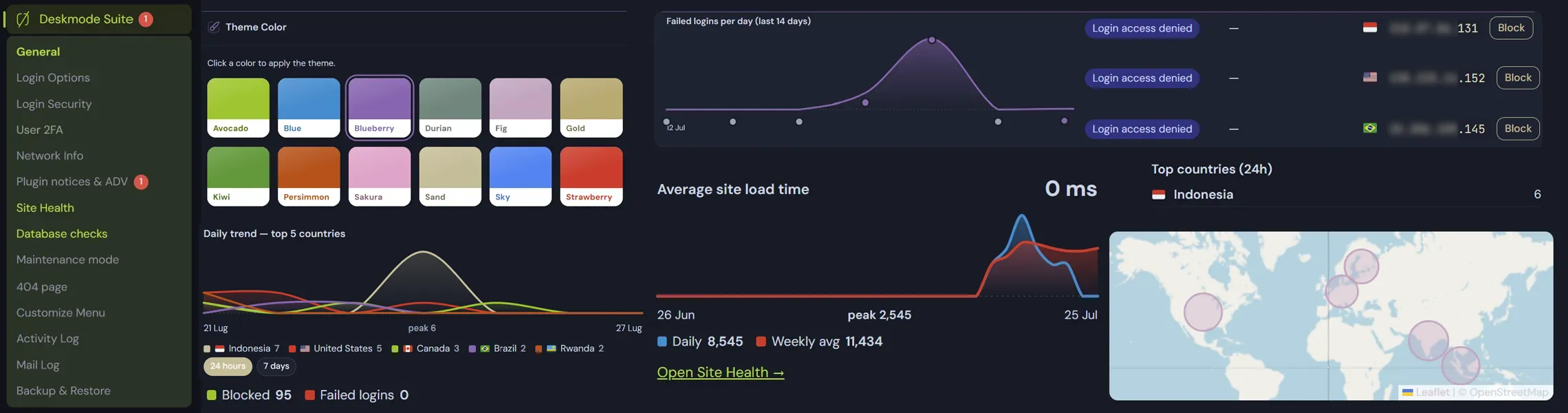
Login and access security
-
Login security
Limits on failed attempts, hourly block counters, lockouts by IP, anti-lockout protection for you, and a record of every rejected sign-in.
Learn more -
Login options
Custom login URL, branded sign-in screen, session length, and the small settings that remove the easy targets.
Learn more -
Two-factor authentication & captcha
App-based 2FA per role or per single user, with recovery codes. No extra plugin, no external service, no monthly fee. Two captcha services are available.
Learn more -
Geofencing
Allow or block sign-in by country, applied at page level before WordPress even prints the form. Search-as-you-type country picker.
Learn more -
Hardening
Disable the file editor and XML-RPC, hide version data, close the openings automated scanners try first.
Learn more -
Alerts
Email notifications for the events that matter: blocked sign-ins, new administrator accounts, plugin and theme changes.
Learn more
Networking tools and IP tracing
-
Network tools, built in
Server details, Whois, DNS records, AS number and IP data at a glance, inside the dashboard. No second diagnostic plugin just to answer a support question.
Learn more -
IP lookup and attack tracing
Take any IP from a log and get country, network owner, AS and hostname without leaving the admin, then block it, or block its whole country, in one step.
Learn more -
Activity log
Who signed in, what they changed, from which IP and country. Filter by user, action or date and reconstruct an incident minute by minute.
Learn more -
404 monitor
Missing URLs, hit counts and requesting IPs. A broken internal link and a vulnerability scan look completely different here, and one of them needs blocking.
Learn more -
Mail log
Every message the site sends, with sender, recipient, originating form and IP. Works with Contact Form 7, WPForms, Gravity Forms, Elementor and hand-coded forms alike.
Learn more -
Site health and charts
Speed trends, health score history and a Task Manager view of every plugin, database time, SQL queries and hooks registered. Your admin finally reads like an analytics tool.
Learn more
Database, backup and maintenance
-
Database controls
Clear expired transients, spot the largest tables, review autoloaded options and delete them with a two-step confirmation.
Learn more -
Safe search and replace
Serialization-aware migration for URLs and paths, with a mandatory preview before a single row is written.
Learn more -
Cloud & FTP backups
Full-site backups to S3-compatible storage or FTP, download and restore from the same screen.
Learn more -
Maintenance mode
A branded holding page with the correct HTTP status while you work, with role and access control so your team keeps going.
Learn more -
Custom 404 page
Turn the bare default 404 into a page that keeps visitors on the site, with search, suggested links and your own design.
Learn more -
Security summary widget
Blocked attempts, recent sign-ins and open warnings on the dashboard, visible the moment you log in.
Learn more
The dashboard experience
-
Admin theme
Restyle the whole admin with 12 one-click accent colours, refined typography and your own logo. Clients notice immediately.
Learn more -
Dark mode, done right
A true dark admin that respects coloured panels, the editor and third-party plugins, with a one-click toggle and a preference saved per user.
Learn more -
Hide banners and ads
Collect upsell notices, review nags and promo banners into one collapsible panel, attributed to the plugin that printed them. Real errors stay visible.
Learn more -
Menu customizer
Reorder, rename or hide admin menu items per role, and keep long menus compact so clients only see what concerns them.
Learn more -
Easy menu items
Remove or duplicate entries in Appearance → Menus with one click, using native WordPress actions so nothing breaks.
Learn more -
Five interface languages
English, Italian, Spanish, French and German, chosen per user from the admin bar without touching anyone else's account.
Learn more
Deskmode speaks five languages
The whole interface - settings, logs, warnings and inline help - is translated into five languages. The choice is per user, stored in the WordPress user profile, so an Italian agency and a German client can work in the same site each in their own language.
How to switch language
- Open the language switcher in the admin bar, at the top of any screen, and pick a language: the dashboard reloads translated.
- Or set it in Deskmode → General, in the interface language field.
- The setting applies to your account only. Other users, and the public site, are unaffected.