

I never got the email - now you can answer

WordPress email log

Every message the site sends is recorded with recipient, subject, outcome and — the part that is usually missing — which plugin sent it. For form notifications you also get who wrote and from which IP address.
The message body is never stored.

How WordPress email log works

Seven columns, one question at a time

The module hooks wp_mail at the lowest possible priority, so it sees the message exactly as WordPress receives it after any other plugin has changed it. If delivery fails, the row already written is updated with the error returned.

  • When and outcome: handed over to the mail server, or failed with the error message.
  • Recipient and subject.
  • Written by: the address found among the submitted form fields. Empty for system emails, which nobody filled in.
  • IP: the address of the request during which the email went out, with the country flag.
  • Sent by: the plugin, the active theme, or WordPress itself.

Check emails sent by WordPress

wp_mail() is a function, not a hook — there is no callback to inspect. The module walks back up the call stack, finds the first file belonging to a plugin or the theme, and turns the folder into the plugin's readable name. It answers the question people actually ask when a site sends forty emails a day.

Who filled in the form

When wp_mail runs during a form submission, the fields are still in the request: the module takes the first valid address that doesn't belong to the site, descending into nested fields too. It works with any form plugin and with hand-written forms, because it doesn't depend on their internal schemas.

  • If the logged-in user can manage users, the field stays empty: an administrator creating an account from the dashboard is a management action, not a public form.
  • Stated limits: with two email fields in the form it takes the first, and if a plugin saves now and sends later via cron, the submitted data is gone by then.

The IP address, without lying

For a contact form it is the person who wrote, because the send happens inside the same request. But cron and command-line emails have nobody behind them, and emails triggered by a dashboard action would carry the administrator's IP — writing that down would be a lie, so the field stays empty. The IP is read the same way geofencing reads it, so it respects the "behind a proxy" setting.

What the page gives you

  • Filter by outcome and search across recipient and subject, twenty-five rows per page.
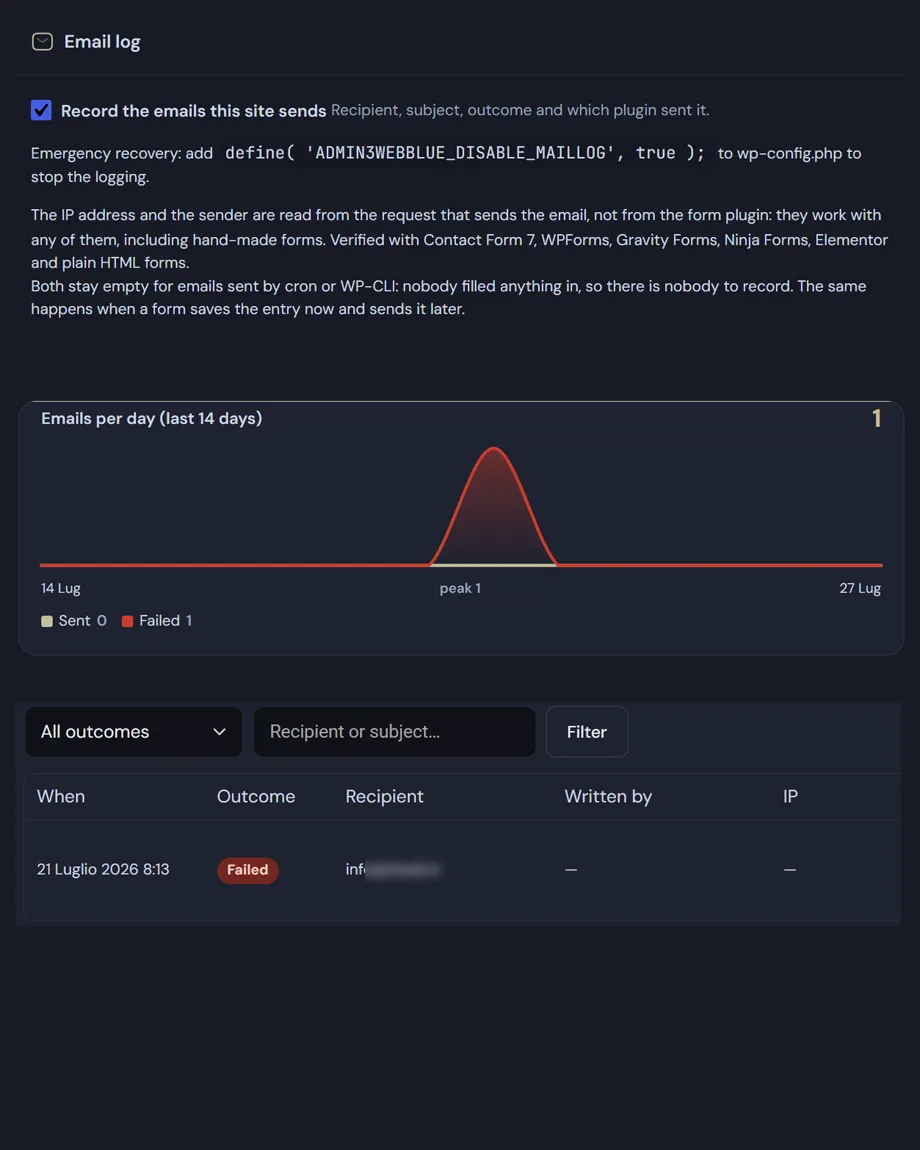
  • A fourteen-day chart with emails sent and emails failed.
  • The log keeps its ten thousand most recent entries and can be cleared with a confirmation step.
  • A dedicated table, indexed by timestamp, outcome, source and IP.

The message body is not stored, and the column that used to hold it is dropped from the table on upgrade: a column that once held password reset links and verification codes should not be left sitting there out of inertia.

Privacy: the log stores email addresses and IP addresses, which are personal data under the GDPR. Collection is switchable and the log can be emptied — mention it in your privacy policy with the retention you apply. Emergency way out: define('ADMIN3WEBBLUE_DISABLE_MAILLOG', true);.
Read the documentation

WordPress email log
WordPress email log: A fourteen-day chart, an outcome filter, and a table with recipient, real sender, IP.

Frequently asked

WordPress email log: the questions we get most

Five answers on what gets recorded, what deliberately doesn’t, and how to read an outcome.

What does the WordPress email log record?

Date and time, recipient, subject, outcome, any error message, the IP address of the request and the plugin that sent it. The module hooks WordPress’s wp_mail() function at the lowest possible priority, so it sees the message exactly as WordPress receives it after any other plugin has altered it.

If sending fails, the row already written is updated with the error returned. There are never two entries for the same message: one row, one outcome.

How do I check emails sent by WordPress and which plugin sent them?

Every row in the WordPress email log names the originating plugin, and it is the field almost always missing elsewhere. wp_mail() is a function rather than a hook, so there is no callback to inspect: the module walks back up the call stack, finds the first file belonging to a plugin or the theme, and shows its readable name.

When a site sends forty messages a day across orders, contact forms and system notices, that is the only way to answer the real question: who sent this.

What does “handed over” actually mean?

That the message was accepted by the mail server, not that it landed in the recipient’s inbox. Those are two different things and worth keeping apart: the plugin can only know the first, because it is all WordPress reports back.

So a green row plus a recipient insisting nothing arrived points to a deliverability problem, almost always missing or misaligned SPF and DKIM records, which send messages to spam or get them rejected upstream. The log tells you which side to look at, and that is half the work.

Is the message body stored too?

No, if you check the emails sent by WordPress, the column that used to hold it is dropped from the table on upgrade. That isn’t a missing feature but a decision: a column that once held password reset links and verification codes should not be left sitting there out of inertia.

What remains are the fields you need to diagnose a problem, without keeping the contents of your users’ correspondence. Worth remembering that email addresses and IPs are still personal data: document the processing in your privacy policy, with the retention period you actually apply.

Why do some rows have an IP address and others don’t?

Because the IP recorded is the one from the request during which the email went out. For a contact form that is the person who wrote, and it is useful. But messages generated by cron or the command line have nobody behind them, and ones triggered by a dashboard action would carry the administrator’s IP: writing it there would be a convenient lie, so the field stays empty.

The log keeps its ten thousand most recent entries in a dedicated, indexed table, can be cleared from the page with a confirmation, and can be switched off entirely with ADMIN3WEBBLUE_DISABLE_MAILLOG in wp-config.php.

Shopping Basket