

WordPress admin plugin. Reimagine your dashbaord.
Customize, secure and measure your WordPress admin
Deskmode Pro Suite is a WordPress admin plugin that changes the way your dashboard looks and makes your login more secure. It turns complicated data into easy to read charts. You can customize WordPress admin colors, menus and dark mode. It also includes 2FA, backups and live performance insights.
Customize WordPress admin only. It never changes your public site.
Twelve colours, six variants, one login page
Customize WordPress admin
The dashboard is what your client sees every day. Normally it looks the same as everyone else's. Our WordPress site management plugin, changes the colors menu and login page without you having to write any code and it does not affect the frontend of your site.
-
Twelve accent colours
Pick from twelve named colours in the admin bar, from any screen. The accent flows through menus, buttons, charts, the login page, the 404 page and maintenance mode - you choose it once.
-
Dark mode, per user
A floating button flips the whole dashboard, instantly and without a reload. The preference belongs to each user and follows their account, so you can work dark while your client works light.
-
A menu that makes sense
Drag items into order, rename them into words your client understands, change the icon and hide what they never need. Per role you can also deny access properly, not just remove the link.
a complete WordPress site management plugin
Everything a serious WordPress admin needs
One WordPress admin plugin, like a box of tools, that helps you manage your backend. It includes a dashboard with dark mode, tools to control who can log in using geofencing, safe migrations, backups to your own storage, live charts that make your data easy to understand and proactive security against attacks.
-
Customize the dashboard
Restyle the whole admin with a modern theme, 12 one-click accent colors and your own logo, clients notice the difference immediately.
-
Dark mode, done right
A true dark admin that respects colored panels, the editor and third-party plugins, with a one-click toggle.
-
Login security with geofencing
Block login attempts from countries you don’t operate in, with anti-lockout protection, two-factor authentication and proactive defense.
-
Database checks & safe migration
Clean expired transients, spot bloated tables, and move URLs and paths with a serialization-aware search and replace.
-
Cloud and FTP Backups
Full-site and database backups to S3-compatible storage or FTP.
-
Charts that make sense of it all
Site speed trends, health score history and a Task-Manager view of every plugin, your admin finally looks like a real analytics tool.
-
Maintenance mode & 404 page
Put the site behind a branded maintenance page while you work, with role and access control, and turn the bare default 404 into a page that actually keeps visitors on your site.
-
Hide annoying banners and ads
Silence the upsell notices, review nags and promo banners other plugins inject into the dashboard, so the admin your clients log into stays clean and professional.
-
Network info tool, embedded
Exclusive features: Server, Whois, DNS, AS, and IP details at a glance, right inside the dashboard, no need to install yet another diagnostic plugin just to answer a support question.
Data, beautifully
Your admin area becomes a dashboard
Most WordPress admin plugins show you a lot of text that is hard to understand. Deskmode Pro Suite uses nice looking charts that load quickly and make it easy to see how your site is performing if it is secure and if the plugins are working properly.
Average site load time
Daily average and 7-day moving average, last 30 days.
Health score
Performance, database and security in one number.
Good · +6 this month
2 warnings, 0 critical issues. Tracked daily so you can prove the improvement to clients.
Plugin resource usage
Database time, SQL queries and hooks, per plugin.
| Plugin | DB ms | Queries | Hooks |
|---|---|---|---|
| WooCommerce | 128.4 | 148 | 980 |
| Elementor | 62.1 | 40 | 430 |
| SEO plugin | 9.7 | 8 | 55 |
| Contact forms | 4.2 | 3 | 38 |
| Backup tool | — | — | 21 |
Blocked login attempts
Last 24 hours, hour by hour.
1,284 ▲ 23%
Where attacks come from
Blocked login attempts, by origin.
Top blocked countries
Geofencing rules in action, last 30 days.
- Russia412
- China338
- Vietnam201
- India147
- Nigeria98
- Brazil88
Allow only the countries you actually work in, everything else never reaches the login form.
Unlike most WordPress admin plugins, Deskmode renders every chart as lightweight inline SVG, no heavy JavaScript libraries, no slowdown..
Install Deskmode Pro Suite WordPress admin plugin and running in minutes
Three steps to a better admin
No configuration marathon: install it, pick your look, switch the protection on.
-
Install the WordPress Admin plugin
Upload the ZIP file in Plugins → Add New, activate it, and enter your license key to unlock all features and enable automatic updates.
-
Make it yours
Choose an accent color, add your logo, enable dark mode and tidy up the admin menu.
-
Turn on protection & insights
Enable login guard and two factor authentication create your first backup then watch the charts fill up.
Security first
A WordPress security plugin that shows you what it is doing
The login page is where your site gets attacked every single day, almost always by automated software trying thousands of combinations without knowing who you are or what you sell. Deskmode Pro Suite works there: failed-attempt limits, country blocking, allow and block lists with CIDR notation, two-factor authentication and captcha.
What separates it from a general-purpose WordPress security plugin is that you also see what is happening. Every blocked attempt lands in a counter, every login in a log, and every address is one click from a lookup showing its country, ISP and network. Blocking without understanding where attacks come from is like locking a door without knowing how many there are.
We want to be clear about two things:
- First, no WordPress security plugin can make your site completely secure on its own. You still need to keep your site updated, use passwords and have a good host.
wp-config.php, because we do not want to lock you out of your site while you are configuring it.
For people running several sites
Deskmode Pro Suite is a WordPress site management plugin that is designed for people who manage sites
If you only have one site you can probably get by with any dashboard. If you manage multiple sites for different clients you have different problems. You need to be able to hand over a site that looks professional get notifications sent to your email address and have a way to troubleshoot problems when they arise.
Deskmode Pro Suite is designed to help you with these problems. The admin theme changes color and menu for each site so you can easily tell which site you are looking at. Security alerts can be sent to any email address you want. The activity log shows you who did what and when. And if a client claims they did not receive a confirmation email the mail log shows you whether the email was actually sent.
You can do the math yourself: buying licenses for different plugins each with its own renewal date and interface versus buying one license, for Deskmode Pro Suite. But the biggest savings is not the money it is the time you save by not having to try to figure out what is going on with your sites.
Real screenshots
This is what it looks like on a live site
No mockups: these are the actual Deskmode Suite widgets, running in a real WordPress dashboard.
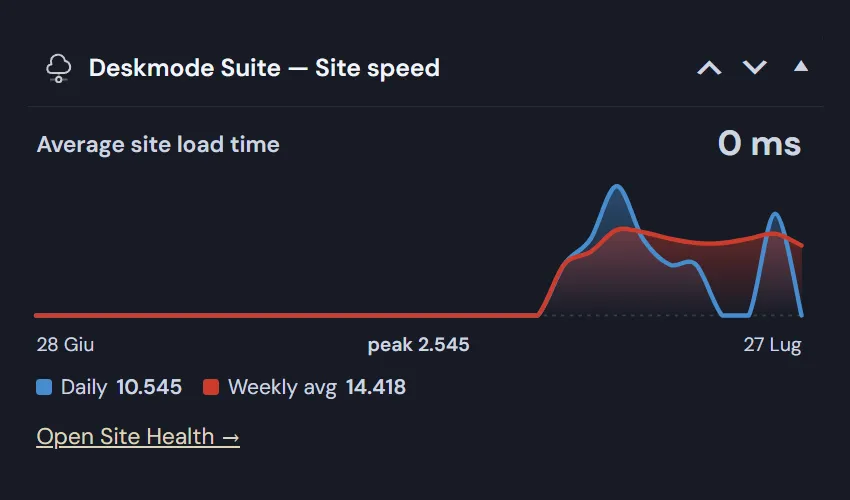
Speed you can watch, not guess
The site speed widget sits on your dashboard and plots average load time day by day, with a weekly average on top so a single bad day doesn’t look like a trend.
- Daily average and weekly average, side by side
- Peak value highlighted, so spikes never go unnoticed
- One click through to the full Site Health report
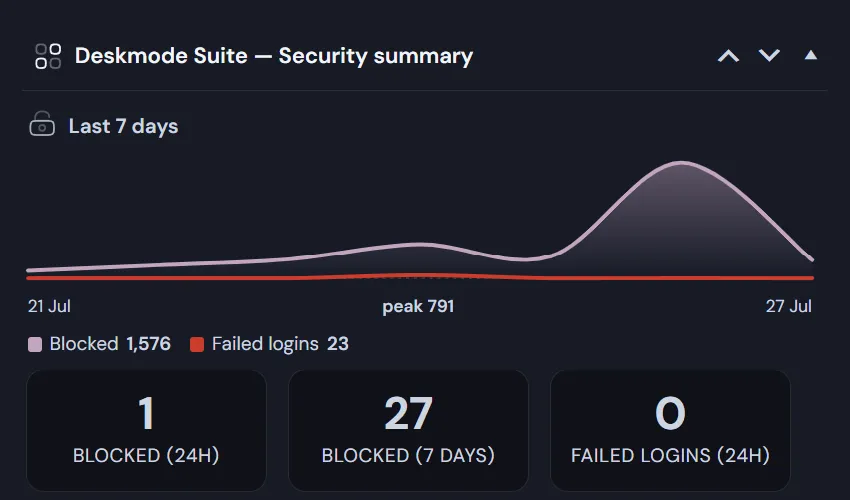
Two very different numbers, finally separated
Most security plugins lump everything into one counter. Deskmode Suite WordPress Admin Plugin keeps them apart, because they mean different things: blocked requests were refused by your rules and never reached the password check, while failed logins did reach it and got the password wrong.
- See at a glance whether your rules are doing the work
- Rules cover country, blocklist, allowed hours and rate limit
- Seven-day view to spot an attack building up
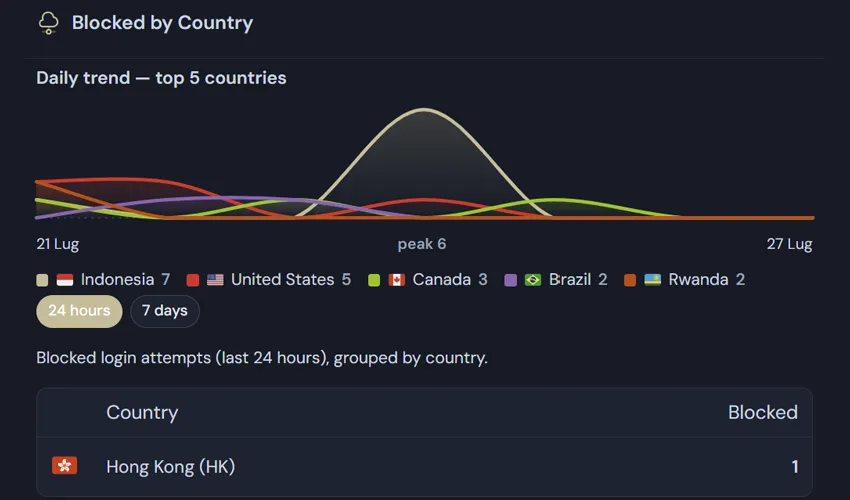
Know exactly where the attacks come from
Every blocked attempt is grouped by country and drawn as a daily trend, so you can turn geofencing from a guess into a decision based on your own traffic.
- Top five countries, colour-coded with flags
- Switch between the last 24 hours and the last 7 days
- Full country table underneath, for the long tail
Simple pricing of the wordpress admin pluign
One powerful suite, three pro licenses
Pick the license that matches how many sites you run. Every plan includes 1 year of updates and support, with a 14-day money-back guarantee.
-
Personal
€49 / year
For a single site.
- 1 site
- All modules and charts
- 1 year of updates & support
-
Most popular
Freelance
€99 / year
For freelancers and small studios.
- Up to 5 sites
- Everything in Personal
- Priority support
-
Agency
€199 / year
For agencies managing many sites.
- Unlimited sites
- Everything in Freelance
- Early access to new features
Licenses renew yearly for updates and support. The plugin keeps working even if a license expires.
Ready to make your admin yours?
Install Deskmode Suite WordPress Admin plugin and reshape your dashboard in minutes, style, security and live charts included.
Frequently asked questions
What exactly does the WordPress Admin plugin customize?
The two places you and your clients look at every day: the login page and the dashboard. On the login page you control the layout, logo, colors and background. In the admin you get a full theme with 12 accent colors, a real dark mode, your logo in the admin bar, a tidier admin menu (hide, reorder, quick-remove and duplicate items), custom dashboard widgets, footer text, plus branded 404 and maintenance pages. It never touches how your public site looks.
Does dark mode work with every plugin?
With most, but honestly not with every one — and it’s worth knowing why. Dark mode works by overriding the CSS of the WordPress admin, so it can only restyle what the browser lets it reach. Three cases fall outside that: plugins that hard-code colors as inline styles on their own elements, which beat any external stylesheet; interfaces rendered inside an iframe (the editor canvas, some page builders), because a parent page cannot style the document inside it; and components drawn in canvas or isolated in a Shadow DOM, which are sealed off from outside CSS. Images with a baked-in white background are a fourth, simpler case. Deskmode Suite covers WordPress core and the common patterns, and includes targeted fixes for the editor and popups — anything exotic can still be handled with a few lines of custom CSS.
WordPress security plugin: how does geofencing work?
When someone opens your login page, Deskmode Suite reads the visitor’s IP address, resolves the country it belongs to and checks it against your rules — you either allow only the countries you operate in, or block the ones you don’t. The check runs before the login form is even processed, so blocked traffic never gets a chance to submit credentials, which stops most brute-force and credential-stuffing noise at the door. Your own IP is protected by an anti-lockout safeguard so you can’t shut yourself out, and every blocked attempt is logged and charted so you can see exactly what was stopped and from where.
WordPress security plugin: how does two-factor authentication work?
2FA adds a second step after the password: even if credentials leak, an attacker still can’t get in. You enable it per user or enforce it for specific roles — typically administrators and editors — and from then on those accounts must confirm a one-time code to finish signing in. It works on the standard WordPress login, so nothing changes in your workflow, and it stacks with the login guard: geofencing filters out unwanted traffic first, 2FA protects the accounts that remain.
Will it work with my theme and other plugins?
Yes. Deskmode Suite themes the WordPress admin area only — it doesn’t change your public site — and is built to coexist with other plugins.
Do the charts slow down my site?
Every chart in this WordPress admin plugin is rendered as lightweight inline SVG — no heavy JavaScript libraries, no slowdown.
Can I use it to migrate a WordPress site?
Yes. The built-in search and replace of Deskmode Pro WordPress Admin Plugin is serialization-aware, so you can change URLs and paths after cloning a site without corrupting serialized data. A preview is required before running.
What happens when the licence expires?
The plugin keeps working with the version you have installed: nothing switches off and no settings are lost. What stops is updates and support, and versions released after your expiry date require a renewal. The key needs to stay in place: remove it and the features switch off, but they come back as soon as you enter it again.