

A WordPress admin plugin to Customize and secure your WordPress dashboard
Close what WordPress leaves open by default
XML-RPC switched off, usernames no longer discoverable, and the login moved to an address of your own. Three settings that remove the first three things an automated scan looks for.
How it works
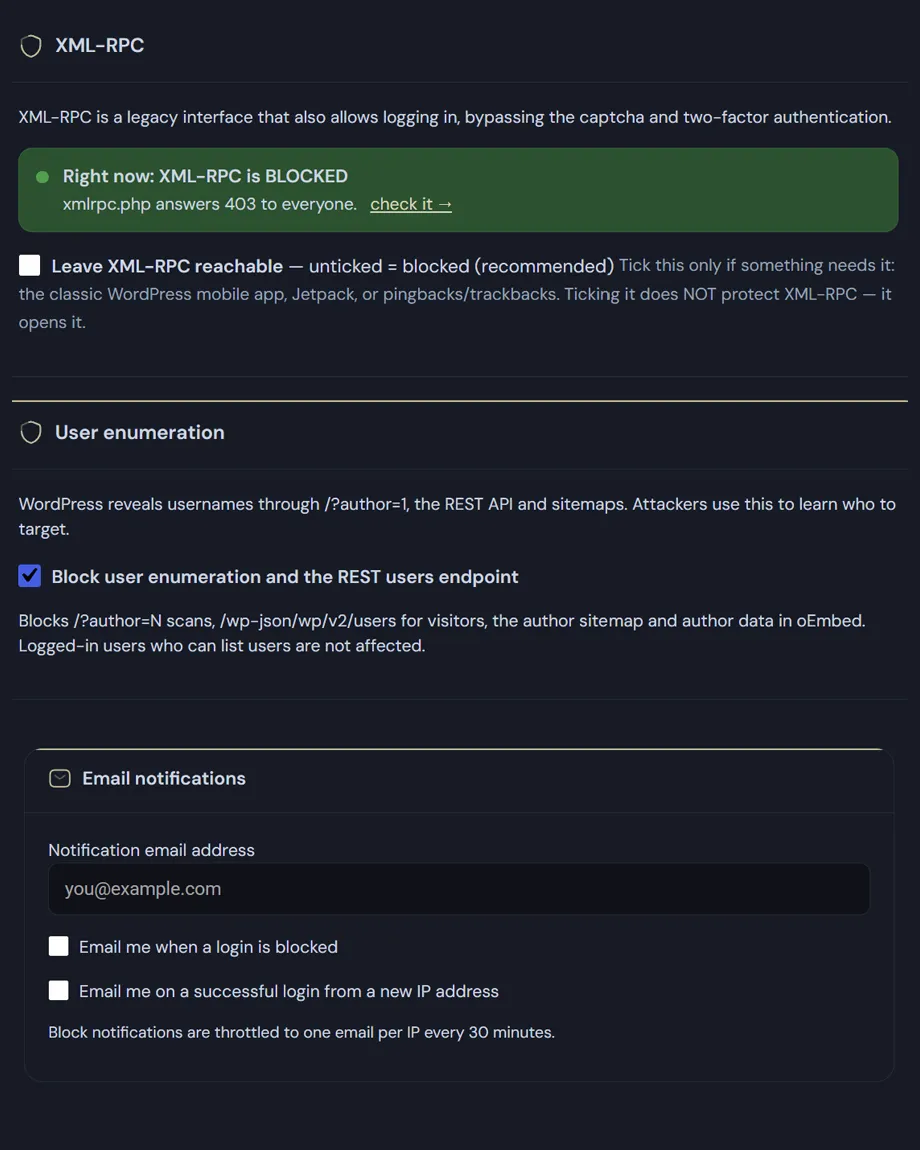
Most sites have never used it, and it is the standard route for password attacks that try hundreds of combinations in a single request. Switched off, xmlrpc.php answers 403 and stops there — the file is blocked outright, not merely reported as unavailable.
WordPress hands out usernames in several places without being asked. Half of a set of credentials, free, before any attack begins. Blocking it closes all of them:
/?author=1 no longer redirects to the author archive that reveals the login name.Signed-in users are unaffected: the block editor queries those endpoints for the author menu, and breaking them would break the editor. Enumeration is an anonymous-visitor problem.
Set your own slug and /wp-login.php stops answering. Every URL WordPress generates — sign-in, sign-out, password reset, registration — follows the new address, so the links in system emails keep working.
Before you change the slug: save the new address somewhere outside the site, and tell whoever signs in. A changed login address is the most common reason a client reports a site as broken when it is working perfectly.
Email notifications: you can be notified when a login is blocked (not recommended... you would get far too many emails) or when a login succeeds (if you are the only one on board... and it isn't you, that notification matters).
Frequently asked
Five answers on the three doors this screen closes, and what to realistically expect from each.
On most sites yes, which is why it ships blocked here. XML-RPC is a legacy interface that also allows logging in, and it does so bypassing the captcha and two-factor authentication: protecting the login form while leaving it open is like fitting a deadbolt and leaving the window ajar.
It is needed only in specific cases: the classic WordPress mobile app, some Jetpack features, pingbacks and trackbacks. If you use none of those, keeping it closed has no side effects. The screen shows the current state in plain words — reachable or blocked — with a link to verify it from outside rather than taking our word for it.
Out of the box, WordPress reveals usernames in at least four ways: /?author=1 URLs, the /wp-json/wp/v2/users REST endpoint, the author sitemap, and oEmbed data. An attacker uses these to learn who to target, because half the work in a brute-force attack is guessing the username.
The option closes all four routes at once. Logged-in users who are allowed to list accounts still see them normally: the door closes for visitors, not for your colleagues.
Let’s be precise: it doesn’t make the login stronger, it makes it less visible. This is security through obscurity, and anyone who has singled you out will find the address anyway.
What you gain is a collapse in volume. Almost all automated attacks try wp-login.php and nothing else, and with the page moved they get a “not found”. Less noise in the logs, less load on the server, fewer attempts to review. Underneath, the failed-attempt limit and two-factor authentication are still doing the real work.
The ADMIN3WEBBLUE_DISABLE_HARDENING constant in wp-config.php puts everything back to standard: wp-login.php answers again and XML-RPC returns to its default behaviour. It requires access to the server files, so it is a way back in for you and not for a stranger.
For the same reason, before switching the custom address on, save it somewhere you will find it again — a password manager, not a sticky note.
No, and anyone promising otherwise is selling reassurance rather than software. These three close the doors automated attacks try first, but WordPress hardening is a wider set: the official WordPress hardening guidance also covers file permissions, prompt updates, strong passwords and your choice of host.
What Deskmode contributes is turning into switches what would otherwise be written by hand in configuration files, and pairing that with the tools to notice when something changes: the activity log, the email alerts and the site health checks.