

Your backup, on your own storage

WordPress Backup to S3

Database and files in a single archive, to download or to upload to your own S3-compatible storage or an FTP server. No middleman service, no third-party cloud subscription, no storage limit set by us.
Your storage credentials are encrypted at rest with AES-256-GCM.

How it works: self-hosted WordPress backup

Self-hosted WordPress backup


WordPress Backup to S3

A backup is a plain .zip holding the SQL dump of your database and the files you choose. No proprietary format: if you ever stop using Deskmode, the archive still opens with anything.

  • Download: the archive lands on your computer without passing through anyone else.
  • S3-compatible storage: Amazon S3, Wasabi, DigitalOcean Spaces, Backblaze B2 through its S3 endpoint, MinIO, and anything else speaking the same protocol.
  • WordPress FTP backup

  • FTP or FTPS: for people who already have space on their own server, with passive mode and destination folder configurable.

What goes into the archive

  • The database dump, table by table, read in batches of five hundred rows so large databases don't exhaust memory.
  • The files: either wp-content alone or the whole installation, your choice.
  • The backups folder and the cache folder are always excluded — a backup inside the backup, and temporary files, help nobody.
  • The filename carries the domain and a UTC timestamp, so archives from different sites never get mixed up.

Authentication without OAuth

The S3 connection uses an Access Key and Secret Key with AWS Signature V4: no redirect to approve, no token that expires at the worst possible moment. There's a test button that checks the credentials before you rely on them, and a log of FTP operations to see where an upload stopped.

Large files are uploaded in eight-megabyte parts using multipart upload, rather than as one request that servers refuse beyond a certain size.

WordPress Backup to S3: credentials, encrypted at rest

  • The S3 Secret Key and the FTP password are stored encrypted with AES-256-GCM.
  • The encryption key is derived from the salts in your wp-config.php, so it is not in the database: anyone obtaining a database dump alone would have nothing to decrypt them with.
  • Stated plainly: this protects against a database-only leak, not against full server compromise, where files are as readable as tables.
  • If you'd rather they weren't in the database at all, define them in wp-config.php as ADMIN3WEBBLUE_S3_ACCESS_KEY and ADMIN3WEBBLUE_S3_SECRET_KEY — the fields then show as locked in the interface.

Restore

Restoring starts from a local archive, one on S3, or one on FTP — remote ones are downloaded automatically first. Every operation, from building to restoring to deleting to testing credentials, requires the capability to manage site options and a valid nonce.

Where local archives live: in a dedicated folder inside uploads, protected by an .htaccess with Deny from all and an empty index file. On non-Apache servers that rule isn't applied — if yours runs nginx, keep your archives on remote storage rather than locally.

The way out: define('ADMIN3WEBBLUE_DISABLE_BACKUP', true); in wp-config.php. Building an archive needs PHP's ZipArchive extension: if it's missing, the module says so instead of producing a broken file.
Read the documentation

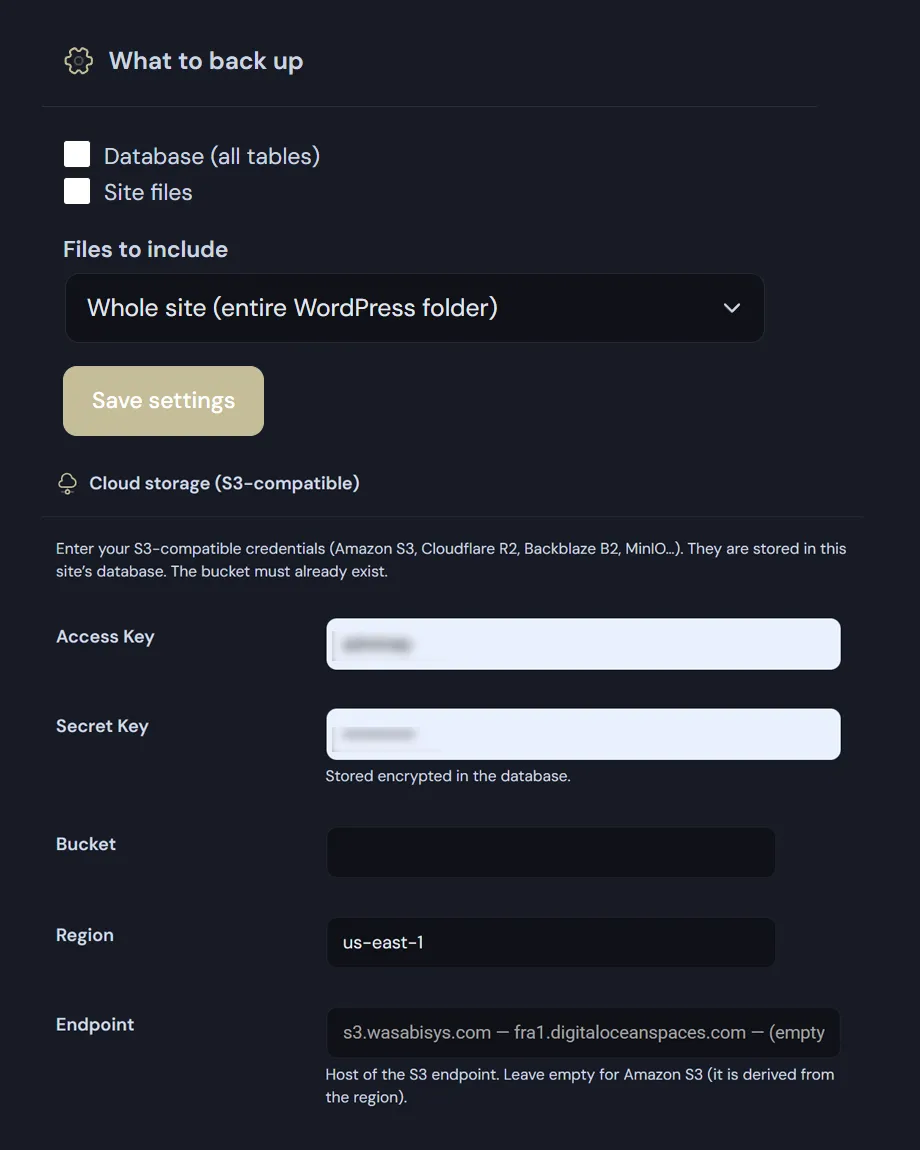
WordPress Backup to S3 settings
WordPress Backup to S3: choosing what to include, configuring S3.

Frequently asked

WordPress backup to S3 and FTP: the questions we get most

Five answers on compatible providers, credentials, large files and restoring.

WordPress Backup to S3: Which storage providers work?

Any that speak the S3 protocol, because the plugin doesn’t hook into one vendor’s proprietary API: it signs requests with AWS Signature V4, the de facto standard.

In practice that means Amazon S3, Wasabi, DigitalOcean Spaces, Backblaze B2 through its S3 endpoint, MinIO on a server of your own, and anything else that implements the same protocol. You need an endpoint, a region, a bucket name and the key pair. There is no subscription with us and no storage limit we impose: you pay your provider, at your provider’s price.

Why access keys rather than an OAuth connection?

Because OAuth brings tokens that expire, and they always expire at the worst possible moment: the nightly backup you thought you had hasn’t run for three weeks and nobody noticed. With an Access Key and Secret Key there is nothing to re-authorise.

There’s also a test button that checks the credentials before you start relying on them, rather than finding out on the first scheduled run that the bucket was unreachable.

How are the credentials stored?

The S3 Secret Key and the FTP password are stored encrypted with AES-256-GCM, and the encryption key is derived from the salts in your wp-config.php — so it is not in the database. Anyone obtaining a database dump alone would have nothing to decrypt them with.

We state the limit plainly: this protects against a database-only leak, not against full server compromise, where files are as readable as tables. If you would rather they weren’t in the database at all, define them in wp-config.php as ADMIN3WEBBLUE_S3_ACCESS_KEY and ADMIN3WEBBLUE_S3_SECRET_KEY; the fields then show as locked in the interface.

Do uploads fail on large sites?

Archives are uploaded in eight-megabyte parts using multipart upload, rather than as a single request that servers refuse beyond a certain size. The database dump is also read in batches of five hundred rows, so PHP doesn’t run out of memory on a big table.

For FTP the plugin keeps a log of operations: if an upload stops, you can see where it stopped instead of guessing. Connections support FTPS and passive mode, which is the mode that works behind most firewalls.

Can I restore straight from a remote archive?

Yes. Restoring can start from a local archive, from one on S3 or from one on FTP: remote ones are downloaded automatically first, without going through your own computer.

The archive is an ordinary .zip holding the SQL dump and the files you selected, so it stays readable with any tool even if you stop using Deskmode one day. No proprietary format, nothing locked in.

Shopping Basket