Deskmode Pro Suite – Customize & Secure Your WordPress Admin
A WordPress admin plugin to Customize and secure your WordPress dashboard
trace WordPress login attacks
Find the origin and close it, on the same screen
Tracing an attempt normally means copying an address, opening a lookup site, opening another one for WHOIS, then coming back to add it to a list. Deskmode keeps all four steps inside the dashboard.
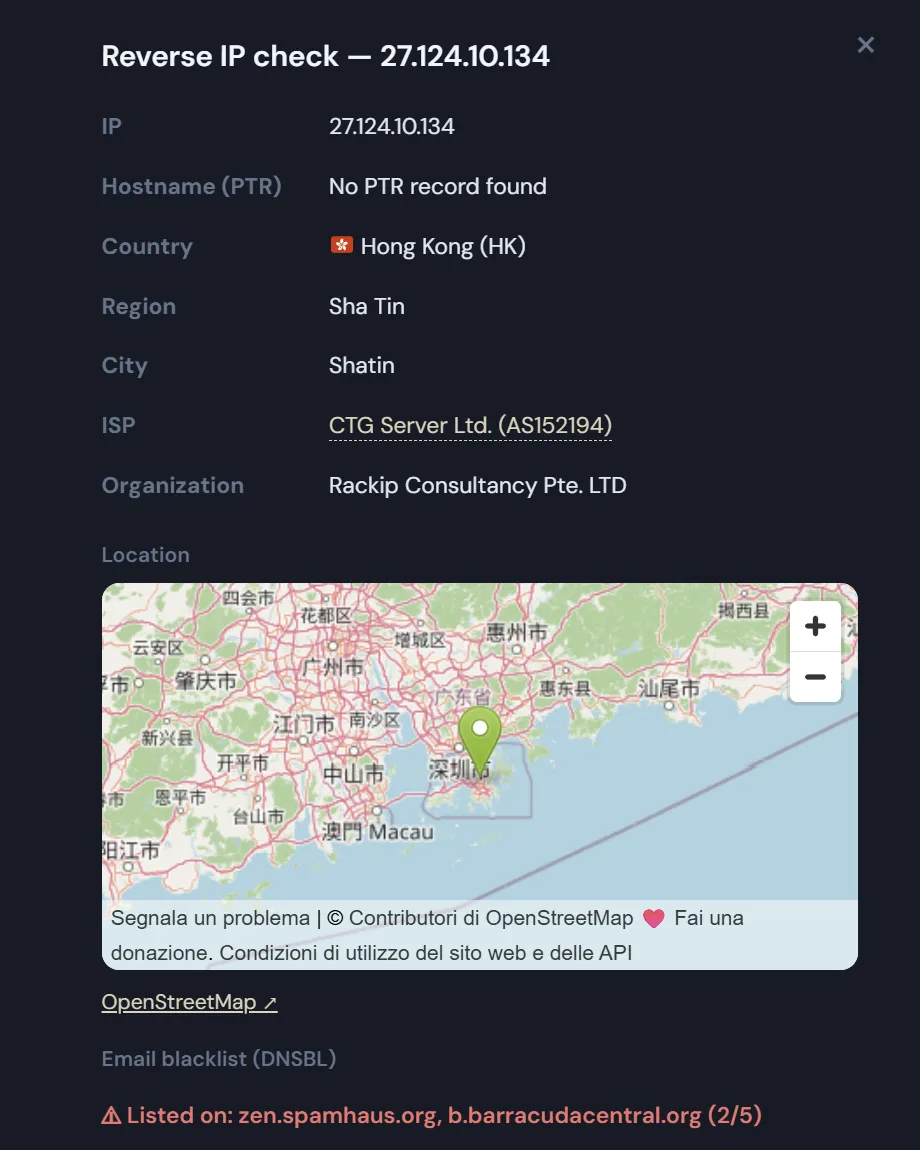
Check a suspicious IP address straight from the log
- In the activity log and in the security screen, every address opens the Network Info page already filled in with that IP — the lookup runs on arrival.
- A Block button next to the address adds it to the manual blocklist without reloading the page.
- Addresses already listed show a Blocked label instead of a button.
- If an address is on the allowlist, no button appears at all: the allowlist takes priority, so Block would promise an effect that never happens. The row says Authorized.
- Both lists are matched by CIDR and wildcards too, not by exact string comparison.
What you learn about an attacker
- Where it is: country and country code, region, city and a point on the map. The same code drives the flag shown next to the address in the logs.
- Who owns the network: ISP, organisation and AS number. The AS detail adds the operator, its regional registry, the allocation date and every announced prefix — enough to tell a residential line from a hosting provider or a VPN exit.
- What the name says: the reverse DNS record, falling back to a local PTR query.
- Its reputation: five mail blacklists checked in one pass.
- Whether it is shared: how many domains resolve to the same address.
The overview on the dashboard
The widget sums up blocked attempts over the last 24 hours and the last 7 days, failed logins over the last 24 hours, and a 7-day chart with both series plotted separately: a request refused by your rules and a wrong password are not the same event and are never merged. Below it, the five countries with the most blocks in the last day and a map where each country is a circle whose area is proportional to the number of blocks, so one very large source cannot visually erase the rest.
Trace WordPress login attacks and create a rule that stops them
Once you know where the traffic comes from, geofencing turns that into a rule: allow only the countries you choose, on the login form or on the whole site.
Anti-lockout: if you save rules that would leave your own address outside, your current IP is added to the allowlist automatically. Tracing an attacker should never lock out the administrator.
A quick note on WordPress IP lookup: the widget reads the counter, not the log. The detailed log is rate-limited to one entry per address every ten minutes so an attack cannot flood it — counting from the log would give an arbitrary fraction of reality.