Deskmode Pro Suite – Customize & Secure Your WordPress Admin
A WordPress admin plugin to Customize and secure your WordPress dashboard
How network tools works
Two panels: one for IPs, one for domains
The Network Info page holds two independent lookups. Both run server-side, both are restricted to users who can manage options, and every request is nonce-checked. Input is validated as an IP address or a domain name before anything leaves your server.
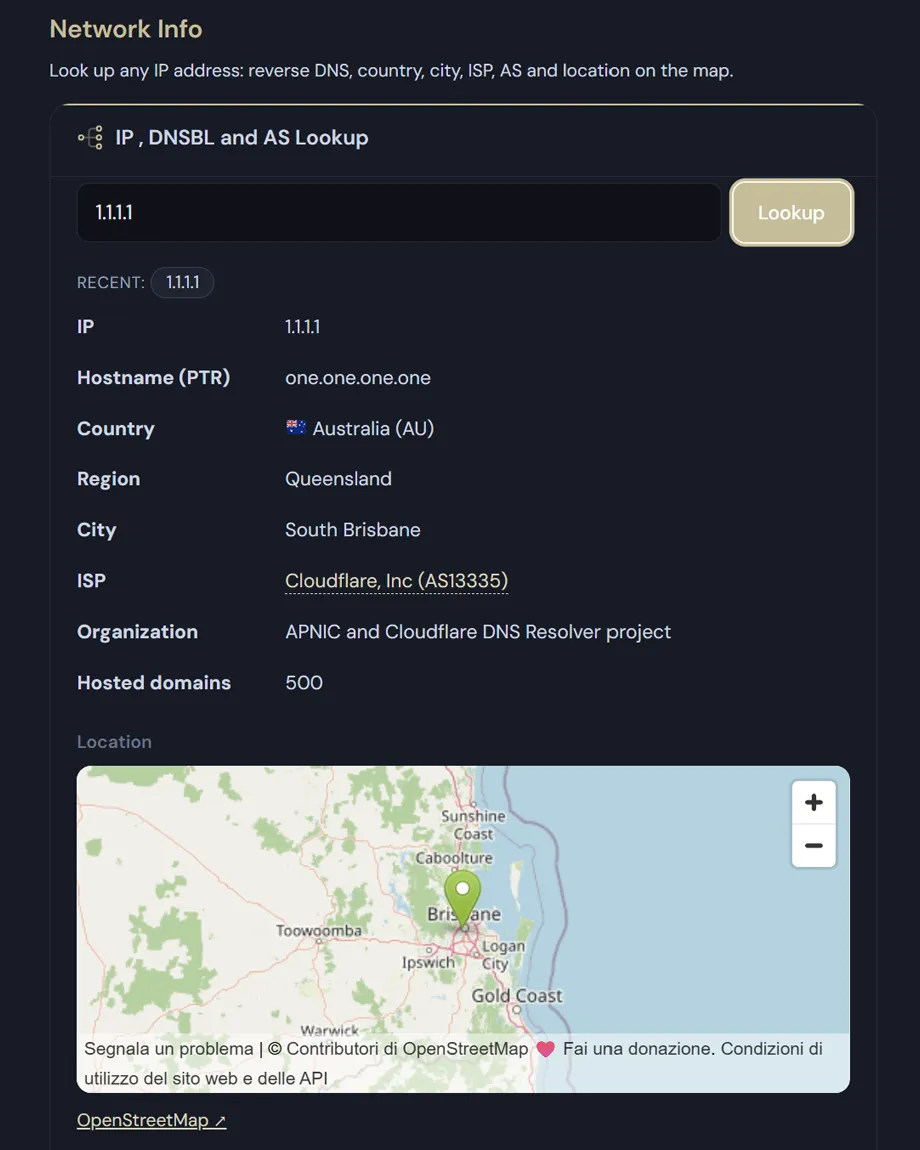
IP, DNSBL and AS lookup
- Reverse DNS (PTR): when no record exists the screen says so, instead of leaving the field blank.
- Country and country code, region, city, ISP and organisation.
- AS number, with the matching point on an OpenStreetMap view.
- How many domains resolve to the same address — telling a dedicated attacker apart from a shared host.
- Five mail blacklists checked in one pass:zen.spamhaus.org, bl.spamcop.net, b.barracudacentral.org, dnsbl.sorbs.net, cbl.abuseat.org.
Run a WHOIS lookup on a domain
- A real port-43 query: it starts at IANA to find the authoritative server for the extension, falls back to a built-in map for common TLDs (.com, .net, .org, .it, .eu, .de, .fr, .uk, .io and more) and follows the registrar referral when the registry returns one.
- Registrar, registration and expiry dates, domain status, nameservers and the full raw record.
- DNS records read from the resolver at query time: A, AAAA, MX with priority, TXT and NS.
- SSL certificate read over a direct TLS connection on port 443: issuer, expiry date and days remaining.
Autonomous System detail
Click the AS name and you get the operator, its country and website, the regional registry, the allocation date, the last update and how many IPv4 and IPv6 prefixes it announces. Data comes from BGPView, with RIPEstat as a fallback when the first source is unavailable.
Light by design
- Everything is cached: IP data and DNSBL results for six hours, DNS for three, WHOIS for twelve, the SSL check for six. Looking up the same address twice costs one request, not two.
- The map library ships with the plugin — only the tiles come from OpenStreetMap, and no third-party script is loaded into your admin.
- Geolocation, AS lookup, blacklist zones and cache lifetimes are exposed as filters, so you can point them at your own infrastructure.
External services: geolocation uses ip-api.com, AS data comes from BGPView or RIPEstat, and the shared-hosting count uses HackerTarget. Only the address or domain you type is sent — never visitor data, never site content.