

A dead end makes people leave

WordPress custom 404 page

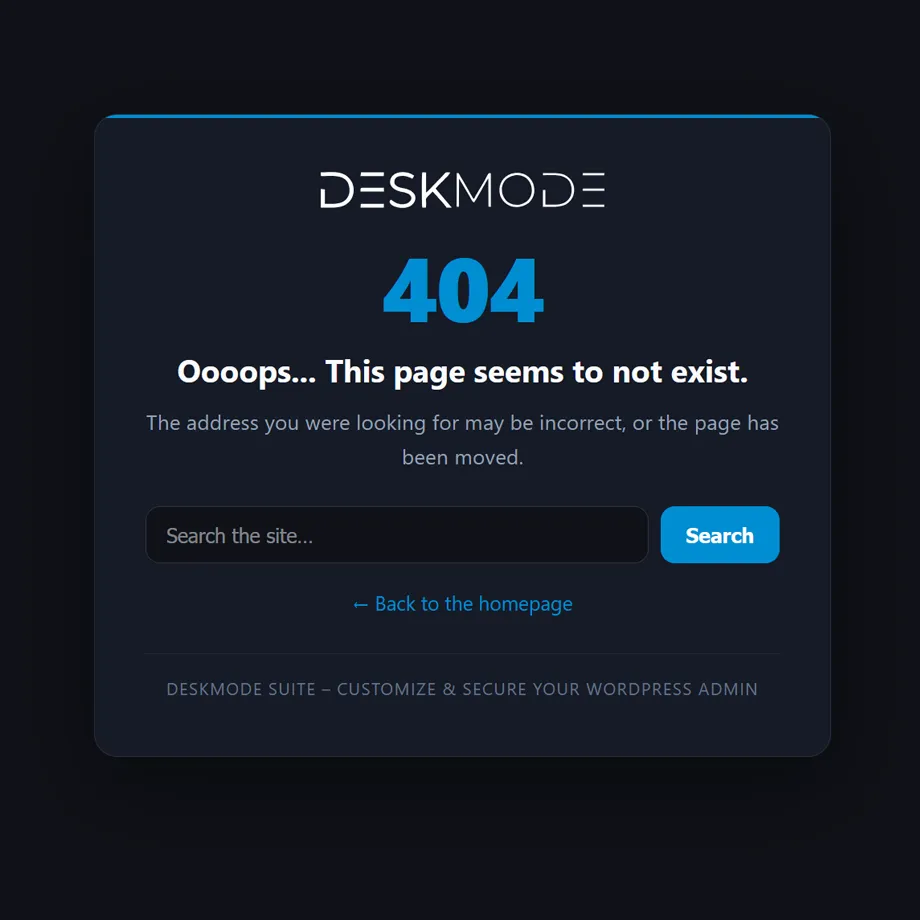
It replaces your theme's "not found" page with one carrying your logo, your words and — above all — a way out: a search box and a link home.
It really answers 404, so search engines drop the missing address instead of indexing a duplicate.

How it works

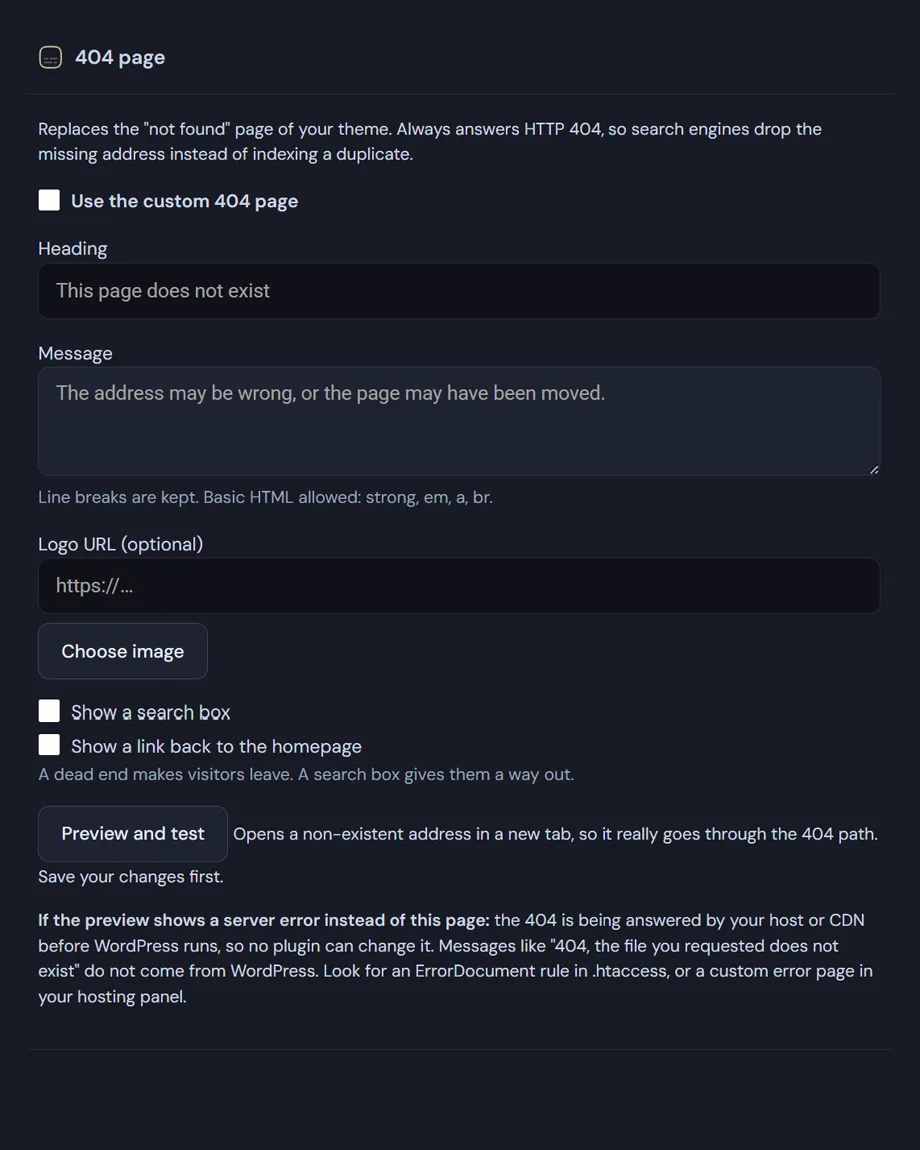
What you can change

  • Heading and message: line breaks stay where you put them and basic HTML is allowed — strong, em, a, br — so you can point somewhere specific rather than just apologise.
  • Logo: picked from the media library, with the URL shown in the field.
  • Search box: optional, pointing at your site search. It's the most effective way out — someone who mistyped an address usually knows what they were looking for.
  • Link to the homepage: switchable on its own.
  • Colour: the accent comes from your dashboard theme, so the page stays consistent without a second place to configure.
  • Languages: heading and message are registered with Polylang and WPML when either is active.

The technical choices that matter

  • The response is a real 404 with noindex, follow: the missing page leaves the index, but the links on it stay followable.
  • The module steps in late in the WordPress cycle, after the theme and other plugins have made their choices, so it doesn't fight anything already handling certain addresses.
  • Robots, feeds and trackbacks are left alone — they don't need a courtesy page.
  • The page is self-contained and light, and doesn't load your theme: if the 404s are coming from an automated scan, you aren't serving the whole front-end thousands of times.

WordPress custom 404 page: the preview is also a diagnosis

The button opens a non-existent address in a new tab, so it genuinely goes through the 404 path. The response is sent with status 200 on purpose: many hosts replace the body of any 404 response — nginx with proxy_intercept_errors, Apache with ErrorDocument — and comparing the two tells you immediately which side the problem is on.

If you see a server error instead of your page: the 404 is being answered by your host or CDN before WordPress runs, and no plugin can change that. Messages like "404, the file you requested does not exist" don't come from WordPress — look for an ErrorDocument rule in .htaccess, or a custom error page in your hosting panel.

Every address that lands here can be recorded: that's the 404 monitor, which shows which broken links are losing you visitors and where they come from.
Read the documentation

WordPress custom 404 page
Setup of a WordPress custom 404 page.

WordPress custom 404 page
WordPress custom 404 page.

Frequently asked

WordPress custom 404 page: what people ask before setting it up

Five answers on indexing, themes, translations and the one problem no plugin can solve for you.

Will a WordPress custom 404 page hurt my SEO?

Not if it answers with the right status code, and this one does. The page returns a real HTTP 404 together with noindex, follow, which is exactly what search engines expect: the missing address drops out of the index, while the links on the page stay crawlable.

The damage happens with the opposite setup. A 404 page served with status 200 — common when people build one as a normal WordPress page and redirect to it — tells Google that every mistyped URL is a valid page with identical content. That produces duplicate content at scale, which is far worse than the original broken link.

Does it replace my theme’s 404 template?

Yes, while it’s switched on, and it steps in late in the WordPress cycle — after your theme and other plugins have made their own choices — so it doesn’t fight anything already handling specific addresses.

The page is self-contained and doesn’t load your theme. That matters more than it sounds: when 404s come from an automated scan hitting thousands of invented URLs, you aren’t rendering your entire front end thousands of times to serve an error.

Can I translate the heading and the message?

Yes. The heading and message are your own text rather than plugin strings, so they can’t live in a translation file. Instead they’re registered with Polylang and WPML whenever either is active, and you translate them in the same place you translate the rest of the site.

With neither plugin installed they simply stay as you wrote them. Basic HTML is allowed in the message — strong, em, a, br — so you can point people at a specific page instead of only apologising.

I set it up but visitors still see my host’s error page. Why?

Because the 404 is being answered by your host or CDN before WordPress runs, and at that point no plugin can change it. Messages like “404, the file you requested does not exist” never come from WordPress.

On Apache, look for an ErrorDocument rule in .htaccess. On nginx, comment out the error_page 404 line and set fastcgi_intercept_errors to off. The built-in preview is designed to diagnose exactly this: it opens a non-existent address so the response travels the real path.

Is a search box actually worth adding?

It’s the single most useful thing on the page. Someone who mistyped an address, or followed a link to a post you moved, usually knows what they were looking for — a search field lets them get there in one step, while a link home makes them start over.

Both are optional and switch on independently, along with a logo from your media library. The accent colour comes from your dashboard theme, so the page stays consistent with the rest without a second place to configure.

Shopping Basket