

If nobody signs in from there, close it

WordPress Geofencing: Block Logins by Country

Allow the login only from the countries and addresses you actually work from. Everyone else never reaches the form: the page answers 404, and there is nothing left to attack.

How WordPress geofencing works

Two lists, two modes

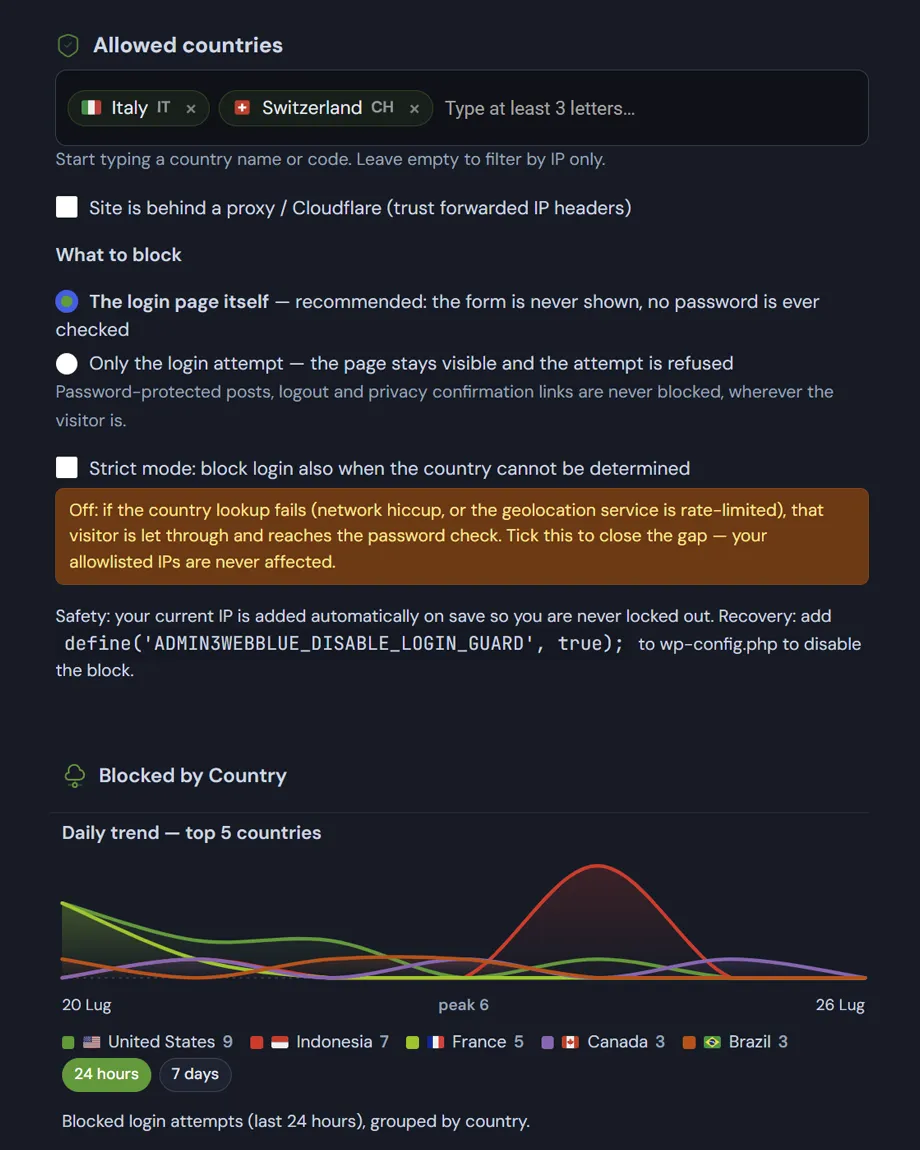
You define the countries allowed to sign in and, separately, the IP addresses that are always allowed regardless of country. An address on the allowlist skips every check. Private and local networks are never blocked.

Where the block happens

  • Page mode: the login page itself is refused before the form is rendered.
  • Authentication mode: the form is shown, credentials are refused.

Page mode is the stronger of the two, and the one to use unless something on the site needs the form to stay reachable.

What stays open

The login page also handles things that have nothing to do with signing in. Password-protected posts, sign-out, privacy-request confirmations and admin email confirmations are always allowed through, so blocking a country does not break the front end for its visitors.

Country lookup

  • Resolved through ip-api.com — free, no key, no account.
  • Results cached for a day; failed lookups retried after fifteen minutes rather than hammering the service.
  • Behind Cloudflare, the country header can be used directly instead, with no external call at all.
  • Strict mode decides what happens when the country cannot be determined: refuse, or let it through.

What gets recorded

Every refusal increments the counters that feed the dashboard charts and the per-country breakdown. The detailed log entry and the email notification are limited to once every ten minutes per address, so an attack cannot flood the log.

The way out of WordPress geofencing: define('ADMIN3WEBBLUE_DISABLE_LOGIN_GUARD', true); in wp-config.php lifts the block if you are travelling and locked out. Your current IP is also added to the allowlist automatically when you save the settings.
Read the documentation

WordPress geofencing: The Deskmode geofencing screen, showing the allowed countries, the IP allowlist and the blocked attempts by country.
WordPress geofencing: allowed countries and blocks by country.

Frequently asked

WordPress geofencing: the questions we get most

Five answers on how the block works, what happens when you travel, and what the GDPR expects.

Is it worth blocking WordPress login by country if attackers use VPNs?

Yes, and the reason is statistical rather than technical. Automated attacks on wp-login.php come from distributed botnets working through thousands of sites a day: they have no interest in routing traffic through a VPN in your country for one target among many. Geofencing won’t stop a determined attacker who picked you specifically, but it removes the background noise, which is around ninety per cent of the attempts.

So treat it as a filter, not as your only defence. Underneath it sit two-factor authentication and the limit on failed attempts, which deal with whoever gets through the filter.

Does it block the attempt, or the whole login page?

Your choice. In page mode, the default, someone arriving from a country you haven’t allowed never sees the form at all: the block happens before wp-login.php renders anything. In attempt mode the page opens but the login is refused.

The first is more effective, because it never exposes the form to bots; the second is safer if you have integrations that go through the login page. Certain actions stay reachable either way, or things unrelated to signing in would break.

What happens when I travel, or when the country can’t be determined?

If your address is on the allowlist you get in regardless: the list of authorised IPs takes precedence over any geographic rule. Local networks and private addresses are exempt from the block by design.

When the country cannot be determined, you decide what happens through strict mode: with it off the login goes through, with it on the attempt is blocked. Off is the right setting for most sites, because a geolocation service that is briefly unreachable shouldn’t lock you out.

If WordPress geofencing locks me out, can I get back into my own site?

It’s the right thing to worry about, and it is handled. When you save rules that would leave your current address outside, your IP is added to the allowlist automatically: a security tool that shuts you out while you configure it is a badly designed one.

If WordPress geofencing locks you out, the way out is the ADMIN3WEBBLUE_DISABLE_LOGIN_GUARD constant in wp-config.php, which suspends the protections from outside the dashboard, with no need to sign in first.

Is geofencing GDPR compliant?

Processing an IP address for security purposes normally rests on legitimate interest, and Recital 49 of the GDPR expressly recognises network and information security as a legitimate interest of the controller. Consent is therefore not required.

Two things remain on you: document the processing in your privacy policy, stating the purpose and the retention period, and check that the period you state matches the one you actually apply. Geolocation uses an external service that receives only the IP address, and the result is cached — no site content and no visitor data leaves your server.

Shopping Basket