

Close the site to visitors, not to search engines

WordPress maintenance mode

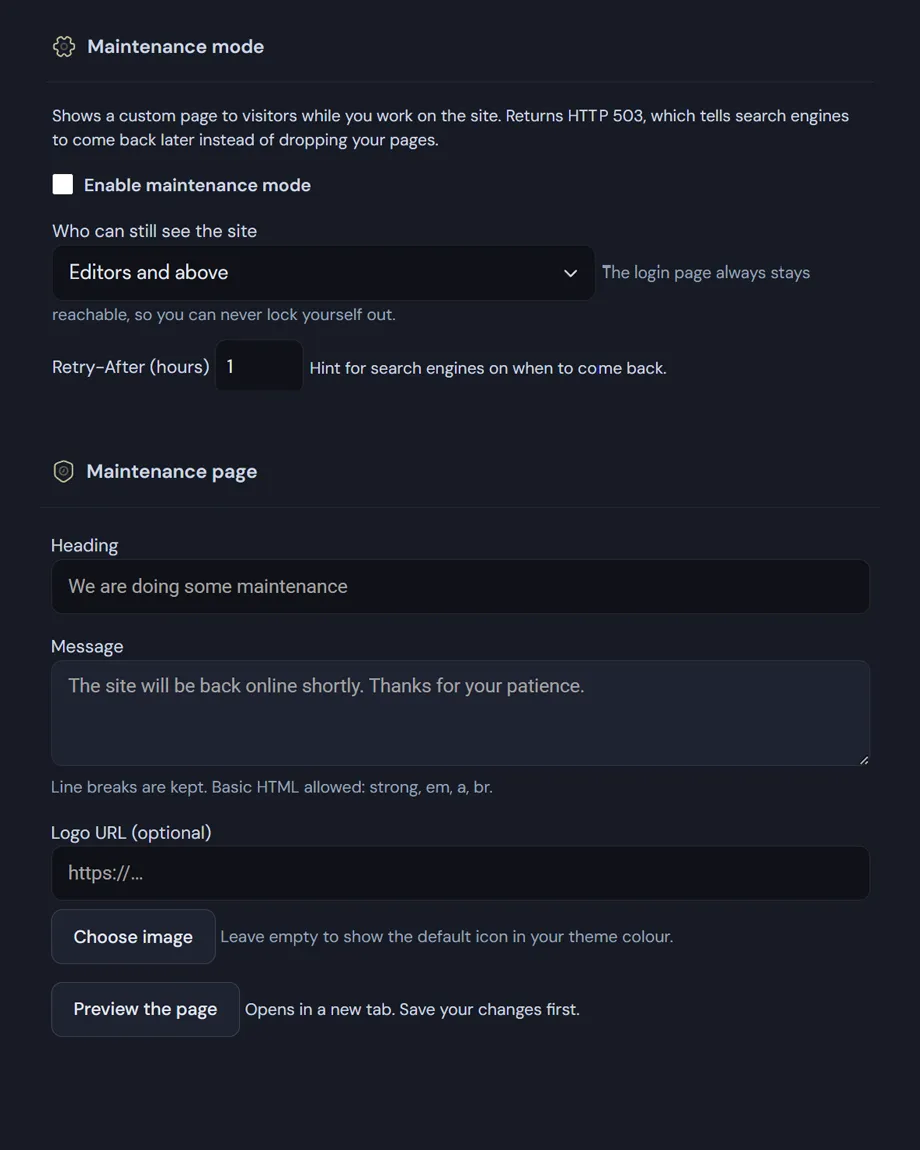
A holding page instead of your site while you work on it, with the right HTTP response: 503 and Retry-After, which tell Google to come back rather than drop your pages from the index.
The login page always stays reachable, so you can't lock yourself out.

How WordPress maintenance mode works

The difference is the status code

Improvised solutions usually serve the maintenance page with an ordinary 200 response. To a search engine that is the new version of your site, and after finding it two or three times it starts replacing your indexed content with "back soon". Here the response is 503 Service Unavailable with a Retry-After header, which is the correct way to say "temporarily down". The page is also noindex, nofollow.

You set the Retry-After window yourself, from one hour to a hundred and sixty-eight: it's the hint about when to return.

If I put WordPress in maintenance mode, who still sees the site?

  • Administrators only, editors and above, or any logged-in user — three levels, pick one.
  • The login page is always excluded from the block. That's deliberate: without it, switching maintenance off from outside would be impossible.
  • AJAX calls, cron and REST requests are also let through, so scheduled jobs and integrations don't break while you work.

WordPress maintenance page

  • Your own heading and message, with line breaks kept and basic HTML allowed (strong, em, a, br).
  • A logo picked from the media library; leave it empty and the default icon appears in your theme colour.
  • It takes the accent from the dashboard, so it stays consistent without a second place to configure.
  • The texts are registered with Polylang and WPML when either is active, so the courtesy arrives in the right language.
  • The preview opens in a new tab and works even with the mode switched off — you can prepare the page calmly before going live.

Hard to leave switched on

While maintenance is active, a flag appears in the admin bar on every screen and a notice sits in the dashboard with a direct link to the settings. It addresses the most common way this feature goes wrong: turning it on for twenty minutes and finding it still on come Monday.

The way out of WordPress maintenance page: define('ADMIN3WEBBLUE_DISABLE_MAINTENANCE', true); in wp-config.php reopens the site even if you can't reach the dashboard.
Read the documentation

WordPress maintenance mode
WordPress maintenance mode: Access settings, the page texts.

Frequently asked

WordPress maintenance mode: the questions we get most

Five answers on status codes, who still sees the site, and how not to leave it switched on.

Will putting WordPress in maintenance mode hurt my SEO?

It depends entirely on the status code, and this is where improvised solutions go wrong. A holding page served with status 200 tells search engines that this is the new version of your site: after two or three crawls, your indexed content starts being replaced with “back soon”.

Here the response is 503 Service Unavailable with a Retry-After header, which is the intended way to say “temporarily down, come back later”. The page is also noindex, nofollow. You set the Retry-After window yourself, from one hour to a hundred and sixty-eight.

Who still sees the site while I work on it?

You choose between three levels: administrators only, editors and above, or any logged-in user. The first suits delicate work; the third is for when the client needs to watch what you are doing while you do it.

AJAX calls, cron and REST requests are also let through, so scheduled jobs and integrations don’t break. And the login page is always excluded: without that choice, switching maintenance off from outside would be impossible.

How do I customise the WordPress maintenance page?

The heading and message are yours, with line breaks kept and basic HTML allowed — strong, em, a, br — so you can point people at a contact instead of only apologising. The logo comes from your media library, and if you leave it empty the default icon appears in your theme colour.

The accent comes from the dashboard theme, so the page stays consistent with everything else without a second place to configure. Heading and message are registered with Polylang and WPML when either is active, so the courtesy arrives in the right language.

Can I see how it looks before switching it on?

Yes. The preview opens in a new tab and works even with the mode switched off, so you can prepare the text, logo and colours calmly, look at the result, and go live only when you are happy with it. There is never a moment where visitors see a half-finished page.

What if I forget to switch it off?

That is the most common way this feature goes wrong, so there are two reminders: a flag in the admin bar visible on every screen, and a dashboard notice with a direct link to the settings. Hard to miss.

And if you have lost access to the dashboard altogether, the ADMIN3WEBBLUE_DISABLE_MAINTENANCE constant in wp-config.php reopens the site from outside, with no need to sign in.

Shopping Basket