free version of deskmode

Free version of Deskmode on WordPress


free version of deskmode


Free version of Deskmode is online on WordPress repository

From today the free version of Deskmode installs straight from your WordPress dashboard: search for Deskmode Suite under Plugins → Add New, hit install, and that is it. No file to download, no account to create, and updates arrive on their own like any other plugin in the directory.

wordpress.org/plugins/deskmode-suite

What’s in it

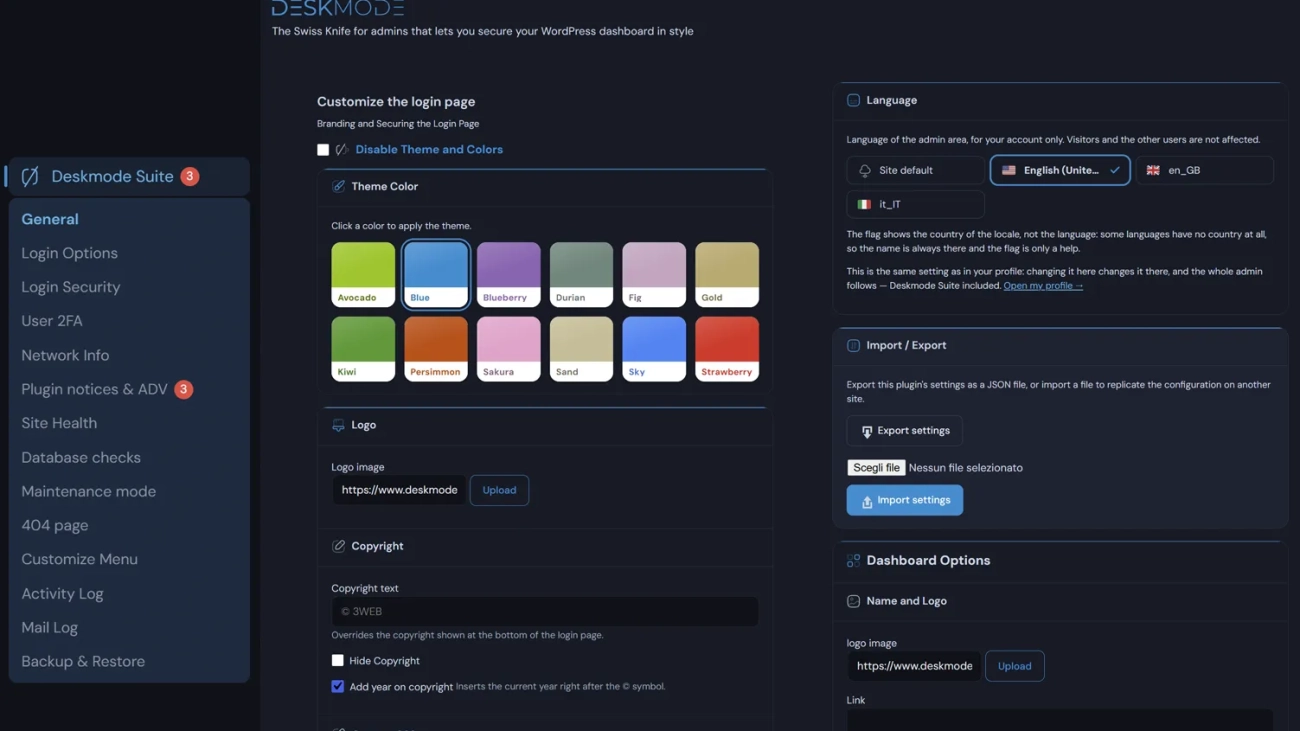
The dashboard theme with three accents, dark mode, the customisable menu with entries you can hide and reorder, the activity log with IP address and country on every event, the site health screen, the network tools, WHOIS, DNS records, certificate expiry and maintenance mode with its holding page.

It is not a trial. It does not expire, it does not ask for a key after thirty days, and it does not switch features off to push you towards the paid version. It is a complete plugin, simply a smaller one than the one we sell.

What the Pro adds

The free version does not include two-factor authentication, country filtering on the login, shared IP reputation, backups to S3 or FTP, the mail log, the 404 manager, the twelve accents, or white labelling with your own logo and footer.

Those are the features that matter when you look after sites for other people. If the theme, the menu and the activity log are what you need, the free version is all you need – and it will stay that way.

Two weeks of review

The WordPress.org directory does not publish what it receives: every plugin goes through a review that reads the code line by line. Ours took seven rounds, and some of what came back made us change things we thought were fine.

The custom CSS field, for instance, is gone: the directory does not allow a plugin to store arbitrary code, because WordPress already has its own editor for that. Settings import now goes through the same sanitisation as the settings form, and every piece of markup the plugin generates is filtered before it reaches the page.

These are changes nobody will ever notice while using the plugin, and they make it harder to do damage with a tampered configuration file. The same fixes went into the Pro version too.

If you try it and something breaks, the support forum on WordPress.org is the right place to say so – the answers stay visible for whoever hits the same problem next. And if it works well for you, a review helps us more than any paid advert.
Proactive WordPress defence

Proactive WordPress defence: shared IP reputation over an API


Proactive WordPress defence: shared IP reputation over an API

Almost all WordPress security is reactive, and for good reason: it counts failed attempts, blocks after the fifth, warns you once something has happened. That works, but it always starts from an attack already under way on your site. You take the first attempt, and the tenth: only then does the system respond. Meanwhile that same IP address has already tried two hundred passwords on another WordPress site. That site knows. You don't.

Proactive WordPress defence: shared IP reputation over an API


The information is already there it just has no way to get to you.

Every time you install Deskmode it blocks people who try to log in. It knows where they are coming from. If you look at these blocks one by one they do not tell you much: an address, a date and a site.. When you put them all together they become something that no single site can figure out on its own, like which addresses are trying to attack WordPress sites right now.

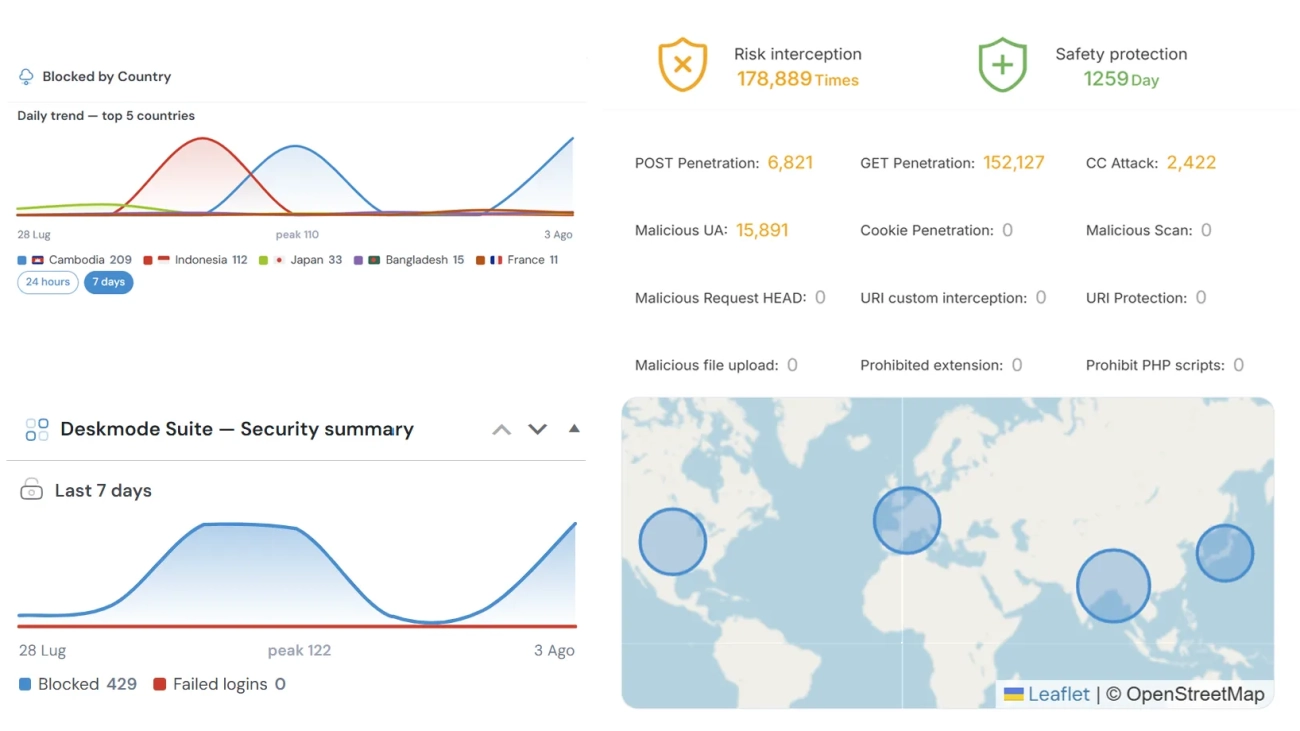
With this release Deskmode Pro Suite collects all this information. A day the plugin sends the addresses it has blocked to our service and gets a list of addresses that other sites have reported. On the Login Security screen you get a list that shows the country where the addresss from, how many sites have reported it and when it was last seen. You also get a chart that shows what happened over the seven days.

This is what we mean by being proactive: we are not just talking about a word we are talking about doing something before it’s too late. If you get the information before the bad address tries to log in to your site you do not even have to deal with the attempt.

People always ask us why do we not block these addresses automatically? If we know an address is bad why not just block it?

The reason is that if we make a mistake it can cause problems. What if a companys VPN or a host that many customers use gets on the list by mistake? It would be blocked everywhere. You would not even know what is going on until you start getting phone calls.

So we show you the shared list of addresses and you can decide what to do. We give you a Block button next to each address. You get to choose. Getting the information early is helpful. We do not want to make the decision for you.

A threshold before an address counts as hostile

We also have a rule that an address has to be reported by least three different sites within thirty days before it gets on the shared list. Each site only gets one vote no matter how times it reports the same address.

This way we make sure that one site that is not set up right or has been compromised cannot put an address on the list. It might take a little longer for the list to fill up. When an address does get on the list it is because many sites have agreed that it is bad.

What leaves your site

The only thing that leaves your site is the IP addresses that you have already blocked. We do not collect any content, visitor data or usernames. Your site is identified by a code that is based on your domain so our service knows how many sites have reported an address, but not which sites.

This feature is turned off by default. You have to tick the box on the Login Security screen before it starts working. This is how all our features work: if they need to reach outside your site they are turned off until you say it is okay.

We believe in reciprocity: the list only works because the sites that use it also help to make it. If you do not want to be part of it you can just leave the box and everything will work just like it did before. You just will not get the list.

Why a WordPress-specific list

We made a list that’s just for WordPress sites because general lists that collect reports from everywhere can be too broad. They might have information about all kinds of attacks. It is not always relevant to you. Our list is different: it only comes from WordPress sites. It only shows attempts to log in to WordPress sites. If an address has just tried to log in to another site, with two hundred passwords that is something you want to know about before it tries to log in to your site.. That is something you might not find on a general list because it gets lost in all the other information.

For general background on protecting WordPress, WordPress.org’s

hardening guide
remains the starting reference.

Ip geofencing result

Why do you need to block an IP address in WordPress?

Why do you need to block an IP address in WordPress?

Every day, every server with a public IP — which is to say almost all of them — and every domain is hit by thousands of attempts against the login page, or against files in folders where attackers know of bugs and flaws they can exploit to take over a site, or an entire system.

Unless you are a system administrator, or you install a plugin that tracks incoming traffic to your WordPress pages, there is practically no way to find out this is happening. Most people have no idea that every machine online is constantly probed by bots: they ping it, scan for open TCP ports, look for files with known vulnerabilities and, above all, hunt for website login pages.

Stopping those attempts before they start is the best way to protect your servers and your sites. That is part of why Deskmode Pro exists: to show you at a glance who tried to reach your pages, and when.

Keeping out of the login anyone with no reason to be there — better still, allowing access to the WordPress login page only from the country where your administrators are — is the most effective way to safeguard your site.

Registrazione degli IP

IP Address Logging and Article 5 of the GDPR

News

IP Address Logging

An IP address is considered personal data if it allows a person to be identified, even indirectly. Recording it does not require the user’s consent if it complies with the rules of the Italian Data Protection Authority and the GDPR.

Storing IP addresses is permitted without consent for cybersecurity purposes, such as blocking attacks or investigating online crimes. In the specific case of WordPress, access to the admin dashboard is subject to numerous daily attacks by bots attempting to gain access using brute-force techniques. Even a perfectly ordinary website can be subject to thousands of login attempts a day simply because IP addresses are scanned completely automatically.

Deskmode Pro Suite
In cases like this, the IP address logging technique  becomes essential to block the sources of attacks at the outset. Our Deskmode Pro Suite plugin was created specifically to perform this task: directly blocking individual attacking IPs or entire IP ranges. Furthermore, through geofencing techniques, it is possible to block access from entire countries (blacklist) or, better yet, grant access only to the countries where the site’s customers reside (whitelist).

From a regulatory standpoint, the logging of IP addresses must not result in the creation of logs that can be retained indefinitely, but only for as long as is strictly necessary to ensure system security or within the limits set by law.

In general, IP addresses are logged and retained for a standard period that typically ranges from 3 to 6 months. This timeframe is considered sufficient to detect systematic threats, analyze recurring patterns, and thereby block malicious IP addresses.

IP Address Logging

Deskmode main screen

Improve WordPress Admin Dashboard


Improve the WordPress dashboard

The WordPress dashboard is the screen you open most often and the one nobody has ever paid attention to. Grey, cluttered, full of plugin notices asking for a review while you are looking for the publish button. If you run one site, you see it every day. If you run thirty, you see it thirty times a day — and every one of them is different.

Deskmode Pro Suite started there. Not from a feature list drawn up in a meeting, but from a series of concrete problems met while looking after sites for other people, and solved one at a time.

One plugin instead of many

The usual way to fix the dashboard is to stack single-purpose plugins: one for the theme, one to hide notices, one for the activity log, one for backups, one for login security. Five plugins that overlap, sometimes conflict, each with its own settings panel somewhere different.

Deskmode replaces them with a single install. Not because doing everything is better on principle, but because these things talk to each other: the activity log records login blocks, the health screen uses the same data, the theme also covers the login page. Keeping them apart means duplicating both information and configuration.

What actually changes, screen by screen

The dashboard gets a look. A clean theme with twelve accents, a real dark mode — not a filter that inverts colours, but a theme that respects third-party plugins' coloured panels — your logo instead of the WordPress one, and a footer carrying your agency's name rather than the default thank-you note.

The menu becomes yours. Hide entries you don't need, reorder them, restrict visibility by role. A client logging in to update three pages does not need twenty entries they cannot use.

Notices go away. All those coloured strips plugins push to the top of every screen are collected into a single expandable line. They are still there, just not in front of you while you work.

The login defends itself. Two-factor authentication, attempt limits, country filtering, allowed hours, reCAPTCHA or Turnstile. Plus a log that gives you, for every event, the IP address, country, network owner, user and exact time.

The site explains itself. A health score with the reasons spelled out, a performance chart, which plugins slow your pages down and which ones contact external servers. Plus database checks and search-and-replace for migrations, with a mandatory preview before anything is written.

Backups go where you say. To your own S3 bucket or your own FTP, not to our servers. We never see them and never keep them.

What we don't do

No telemetry, no usage statistics, no phoning home. The features that do reach outside — IP geolocation, vulnerability scanning, shared reputation — are all off by default and documented one by one, with what they send and when.

That seems the least you can expect from a tool that lives inside your clients' admin panel.

Who it comes from

Deskmode is built by 3WEB, who have been building and maintaining websites since 1999. Nearly every feature in the plugin started as a problem on a real site rather than a line on a roadmap — which is why some are very specific, and some you might expect are not there at all.

There is a free version too, with the theme, dark mode, the customisable menu and the network tools. It is not a time-limited trial and it does not expire: it is a complete plugin, simply a smaller one.